
Post #1 · Posted at 2011-03-20 10:08:23pm 15.2 years ago
 silenttype01 silenttype01 | |
|---|---|
 |
Member+ |
| 8,035 帖子 | |
 | |
| Reg. 2007-01-19 | |
| "DINGDONG♥HEARTS" | |
It seems that my computer mouse lags and then stops functioning. The mouse is the only part that's not responding. I can navigate perfectly fine with a keyboard. Is there anyway to fix this?
Things I've already tried:
1. Restarting the computer
2. Switching out another mouse.
3. Opening up the mouse to check the insides.
Things I've already tried:
1. Restarting the computer
2. Switching out another mouse.
3. Opening up the mouse to check the insides.
Post #2 · Posted at 2011-03-20 10:35:03pm 15.2 years ago
| Exor | |
|---|---|
 |
Member |
| 3,644 帖子 | |
| | |
| Reg. 2008-05-29 | |
 | |
| "^ featured on Law & Order" | |
Is it an optical mouse? If so, it may be that the infrared light on the bottom is giving out.
Is it a wired mouse? Check the wire.
Is it a wired mouse? Check the wire.
Post #3 · Posted at 2011-03-20 11:04:06pm 15.2 years ago
| EarthPluto | |
|---|---|
 |
Member |
| 941 帖子 | |
 | |
| Reg. 2009-01-19 | |
| "For Aiur~!" | |
Where do you plug the mouse to?
If USB,plug it to another slot. If PS/2,buy the new one.
If USB,plug it to another slot. If PS/2,buy the new one.
Post #4 · Posted at 2011-03-20 11:23:28pm 15.2 years ago
| silenttype01 | |
|---|---|
|
Member+ |
| 8,035 帖子 | |
| | |
| Reg. 2007-01-19 | |
| "DINGDONG♥HEARTS" | |
I don't think it's the infrared in the mouse as I plugged in my sister's mouse, which works fine on her computer, does not work on mine.
And what's a PS/2? I'm hoping that I don't have to buy anything.
And what's a PS/2? I'm hoping that I don't have to buy anything.
Post #5 · Posted at 2011-03-20 11:26:23pm 15.2 years ago
| EarthPluto | |
|---|---|
|
Member |
| 941 帖子 | |
| | |
| Reg. 2009-01-19 | |
| "For Aiur~!" | |
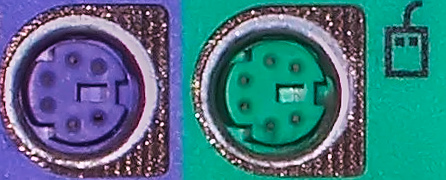
That's PS/2 slot..