
Post #1 · Posté à 2013-04-21 01:09:07pm il y a 13.1 années
 JohnnyAppleC JohnnyAppleC | |
|---|---|
 |
Member |
| 10 Messages | |
 | |
| Reg. 2012-07-25 | |
| "Huh?" | |
Any ideas on what I can do to increase/decrease the volume of a song if it gets too loud or quiet in the stepmania game and why it does that? I know turning up/down your computer speaker volume works but I don't want to do that as a lot of other songs have about the same volume.
Post #2 · Posté à 2013-04-21 01:59:56pm il y a 13.1 années
| Pandemonium X | |
|---|---|
 |
Member |
| 10,361 Messages | |
| | |
| Reg. 2007-04-06 | |
  | |
| "Is this thing still on?" | |
It depends on if the audio file itself is loud or not.

Post #3 · Posté à 2013-04-21 09:42:10pm il y a 13.1 années
| dougshell | |
|---|---|
 |
Member |
| 27 Messages | |
| | |
| Reg. 2013-04-10 | |
maybe a way to normalize volume could be added to stepmania.
Post #4 · Posté à 2013-04-21 09:52:50pm il y a 13.1 années
| xXMokou98Xx | |
|---|---|
 |
Member |
| 2,461 Messages | |
| | |
| Reg. 2010-07-07 | |
| |
| "meme school" | |
An easy solution (as in it's not hard) would be to manually lower/raise the volume of the files via any audio editor. Is it tedious? Hell yeah, but seeing as there's no current way for stepmania to normalize the volume of all the files, this is a simple little solution. There's the issue of the sound quality dropping as you raise the loudness for some file, but assuming those song files are of good quality that isn't really a problem.


Post #5 · Posté à 2013-04-21 10:14:38pm il y a 13.1 années
| AeronPeryton | |
|---|---|
 |
Member+ |
| 4,338 Messages | |
 | |
| Reg. 2007-03-03 | |
| "Give me a steady beat." | |
Without a normalization method within StepMania itself, the only alternative is to painstakingly adjust song volumes manually. Audacity has a features called Amplify that adjusts the decibel level of audio. By default it increases the volume as much as it can without causing clipping. If you have individual simfiles that are too quiet, you can run those through the program and re-save them with minimal quality loss.
If a song gets too quiet or too loud at a specific point it takes a bit more doing to target that section of audio and smooth things out.
If a song gets too quiet or too loud at a specific point it takes a bit more doing to target that section of audio and smooth things out.
Post #6 · Posté à 2013-04-22 01:32:43am il y a 13.1 années
| XeneSyS 87 | |
|---|---|
 |
Member |
| 711 Messages | |
| | |
| Reg. 2012-04-17 | |
Or...you can find freeware such as MP3Gain what I use to batch "normalize" volumes of entire directory(ies) at once. It's a whole lot faster than manually amplifying songs one-by-one.
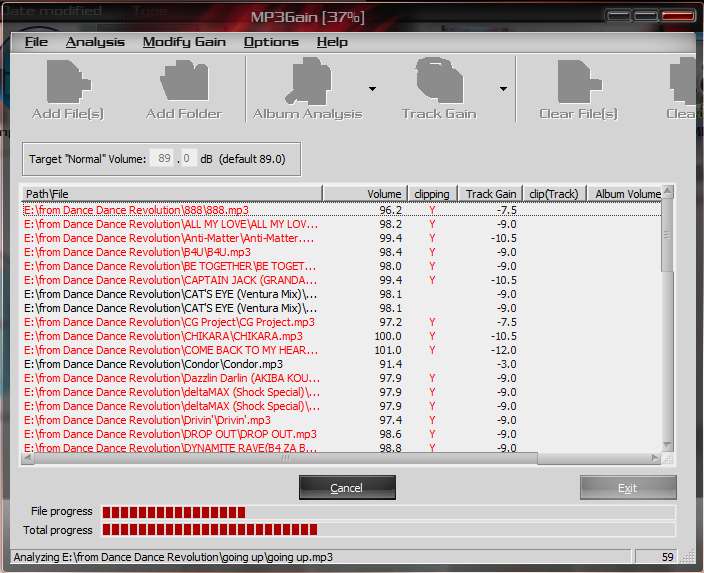
This is just a quick example of what the interface is like. The Target volume can be adjusted,and only .mp3 files will show up. It's not compatible with .ogg.
This is just a quick example of what the interface is like. The Target volume can be adjusted,and only .mp3 files will show up. It's not compatible with .ogg.
Post #7 · Posté à 2013-04-22 09:30:49am il y a 13.1 années
| bmhedgehog | |
|---|---|
 |
Banned+ |
| 3,136 Messages | |
| Not Set | |
| Reg. 2008-07-13 | |
| "BANNED" | |
maybe I should give this MP3Gain some consideration. Thanks for the tip.